Most website problems are invisible to the owner. You’ve visited your own site dozens of times, you know what it contains, and it looks fine to you. But a stranger visiting for the first time — someone who found you through a Google search — sees something different. They don’t have context. They’re making a quick judgement about whether you’re worth contacting or not.
That judgement happens in seconds, and it starts before they even click on your site.
How can a website drive customers away without you knowing?
A website drives customers away when it fails to meet the expectations of a first-time visitor. This doesn’t mean it has to be broken or ugly. It means that something — a missing security certificate, a slow loading time, a mismatch between the Google result and the page that opens, or simply no clear sign that you’re a real operating business — creates enough doubt that the visitor leaves and tries someone else.
The problem is that none of this registers as a failure when you look at your own site. You fill in the gaps automatically with what you already know about your business.
What do customers see before they click on your website?
The first thing a potential customer sees is your Google search result — the listing that appears when they search for what you do. This consists of your page title (the blue clickable link), the URL, and a short description below it.
If that listing is vague, outdated, or doesn’t match what they searched for, they won’t click. They’ll click the result above or below yours instead.
A listing that says “Home — YourBusiness.com” with a description pulled randomly from your page tells a visitor nothing. A listing that says “Plumber in Bristol — same-day emergency call-outs” tells them exactly whether you’re relevant.
→ Read more: What do customers see when they find your website on Google?
→ Read more: How your Google listing affects whether people click through
Does your website look trustworthy when someone arrives?
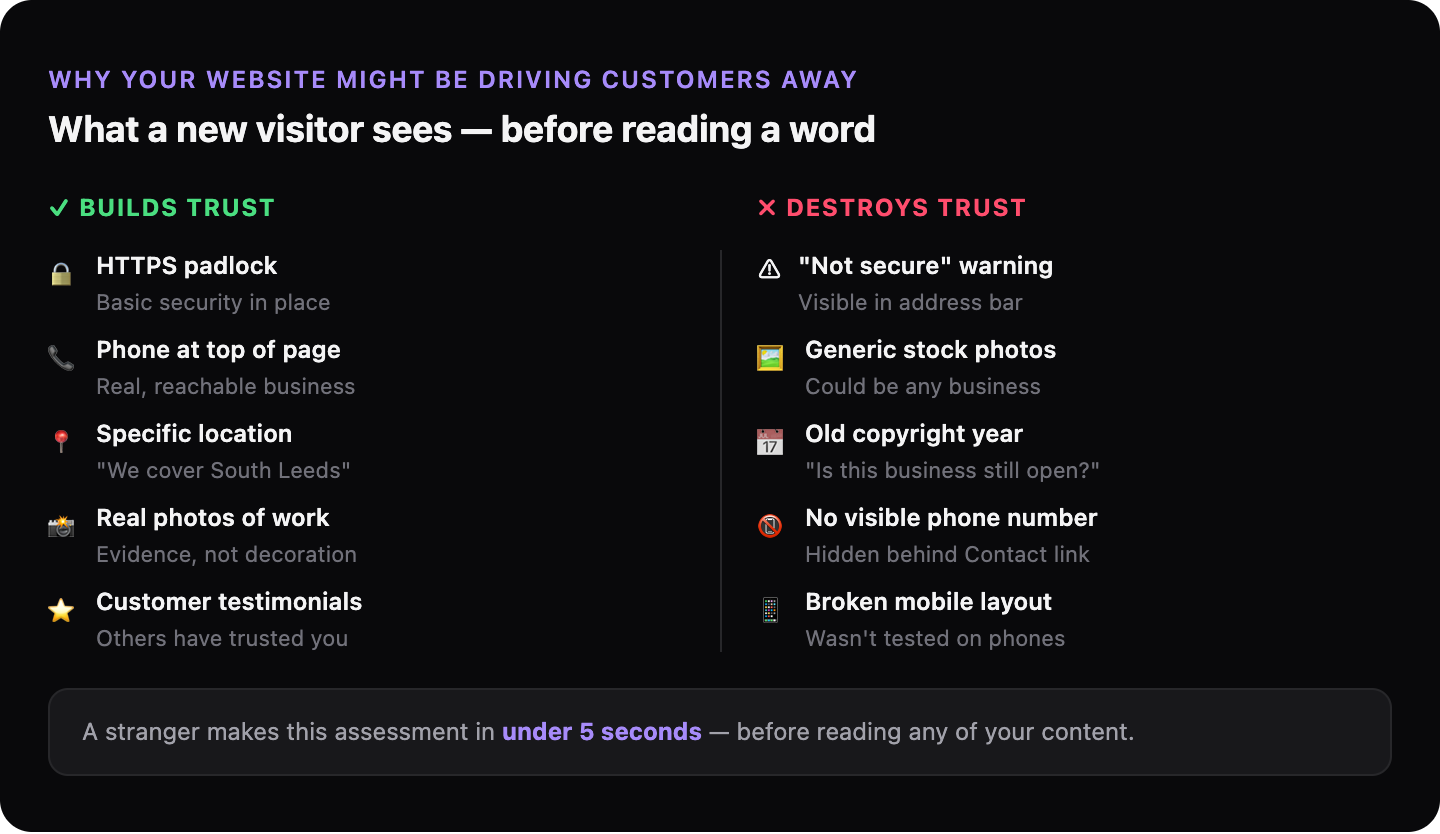
When a visitor lands on your site, they make a rapid, largely unconscious assessment of whether this looks like a real, trustworthy business. Several things influence that assessment immediately:
| What they notice | What it signals |
|---|---|
| “Not secure” warning in browser | Basic security hasn’t been set up |
| No physical address or service area | Hard to verify this business is real |
| Stock photos instead of real images | No evidence of actual work or people |
| Copyright date several years old | Is this business still operating? |
| No prices, no process explained | What am I getting into? |
| Mobile layout broken or hard to use | Whoever built this didn’t care |
None of these individually will always drive someone away. But several together create a picture of a business that isn’t paying attention — and that’s a reason not to call.
What does “your site is not secure” mean for your customers?
When a browser shows “Not secure” next to your website address, it means your site isn’t using HTTPS — the encrypted connection that keeps data safe between a visitor’s browser and your server. Browsers started flagging non-HTTPS sites visibly around 2018.
Your customers may not know what HTTPS means. But they do know what the warning looks like — they’ve seen it before, and they’ve been told it means the site isn’t safe. For many visitors, especially on mobile, this is enough to make them leave.
HTTPS is also a Google ranking signal. Sites without it are ranked lower than equivalent sites that have it.
→ Read more: What “your site is not secure” means for your business
Why does a website that looks good to you feel wrong to customers?
Design and performance are different things. A site can be visually attractive — good fonts, nice colours, professional photos — and still perform badly for a first-time visitor because of what it doesn’t say or do.
The most common example: a homepage that looks like a brochure. It has a beautiful hero image, a mission statement, and some information about the company. But it doesn’t answer the question a potential customer is actually asking when they land on it: “Can you solve my problem, and should I call you?”
A site that looks impressive but doesn’t answer that question quickly will lose visitors to a simpler, plainer site that does.
→ Read more: Why a website that looks good can still perform badly
What does a first impression online actually depend on?
First impressions on a website are shaped by: how fast the page loads (visitors form opinions before they finish reading), how clearly the page communicates what the business does and for whom, whether there are visible signs of trust, and whether there’s an obvious next step.
A visitor who lands on your site and immediately understands “this is a plumber who covers my area, they have real photos of their work, and here’s their number” is far more likely to contact you than a visitor who has to work to understand what you do.
→ Read more: First impressions online: what your website signals to a new customer
How do you find out what your website is signaling to customers?
GhostSite checks the signals your website sends — HTTPS, how your Google listing appears, page speed, and the technical quality signals Google uses to assess your site. You get a plain-language report showing exactly what a first-time visitor experiences.