Traffic without results is one of the most frustrating website problems. Your site is getting visitors — you can see it in the analytics — but the phone isn’t ringing and the inbox is empty. The website exists, people are finding it, and then nothing happens.
This isn’t a mystery. There are a small number of reasons visitors don’t convert into enquiries, and they’re all diagnosable.
Why does a website get visitors but no enquiries?
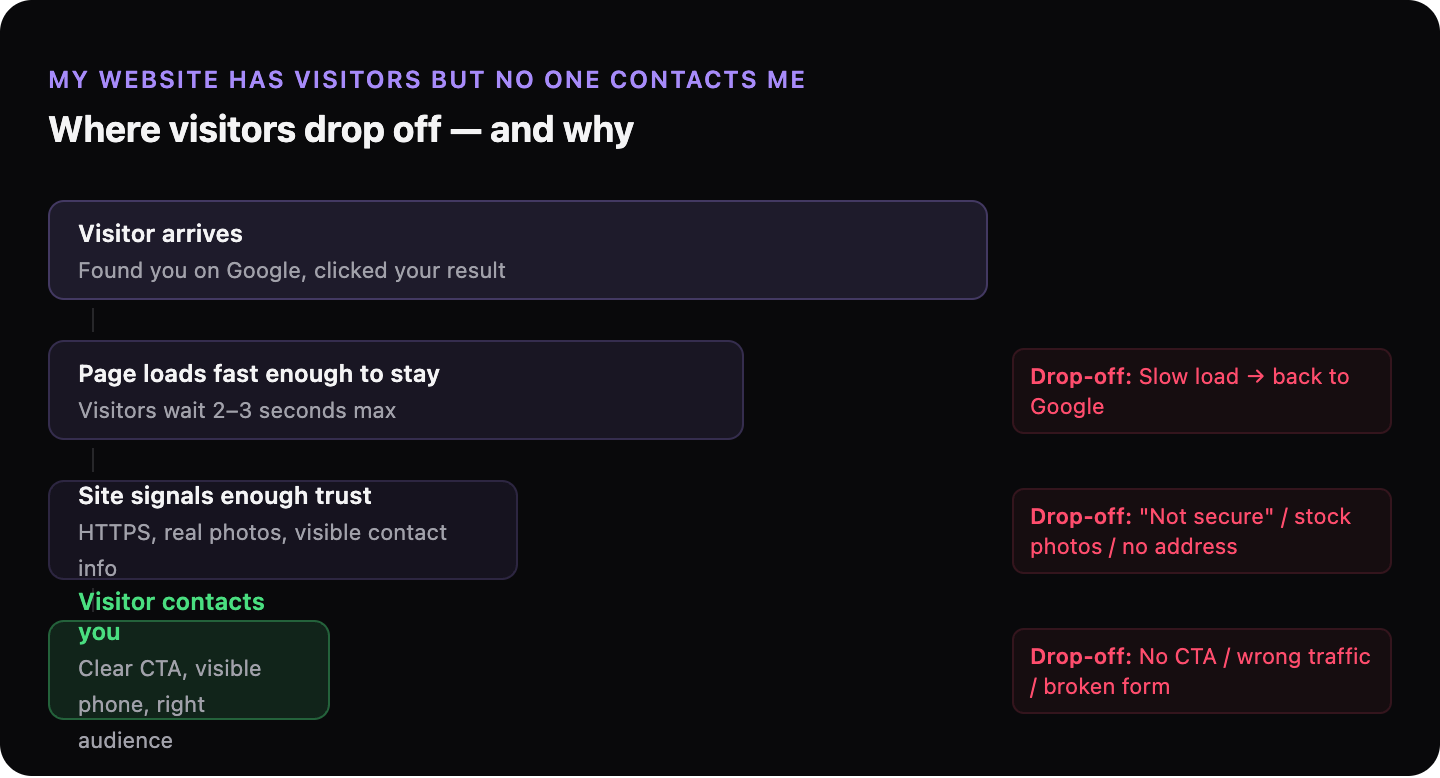
The gap between a visitor arriving and a visitor contacting you comes down to three things: whether the page loaded fast enough for them to stay, whether it gave them a reason to trust you, and whether it made clear what they should do next. If any one of these is missing, most visitors will leave without acting — even if they were genuinely interested in what you offer.
Getting traffic to your site is only half the job. The other half is what happens when they arrive.
Is your website fast enough to keep visitors around?
Page speed is how quickly your website loads and becomes usable. If a page takes more than two or three seconds to load, a significant portion of visitors will leave before seeing any of your content. They don’t wait — they go back to the search results and click the next result.
This is a conversion problem before it’s a ranking problem. A slow site loses customers at two points: fewer people find it (because Google ranks it lower), and fewer of those who do find it stay long enough to contact you.
Speed problems are usually invisible to the website owner. You’ve visited your own site many times — it’s cached in your browser and loads fast for you. Your first-time visitors don’t have that advantage.
→ Read more: How page speed is costing you customers
→ Read more: What a slow website actually costs a small business
Does your website give visitors a reason to trust you?
A visitor who doesn’t trust your website won’t contact you, no matter how good your service is. Trust signals are the elements that tell a stranger “this is a real, legitimate business.”
Common trust signals that are often missing:
| Present on site | What it signals to a visitor |
|---|---|
| HTTPS (padlock in browser) | Connection is secure, business takes basic precautions |
| Physical address or service area | Real business with a real location |
| Phone number visible without scrolling | Easy to reach, nothing to hide |
| Real photos (not stock images) | Actual people, actual work |
| Recent activity (updated dates, fresh content) | Business is still operating |
HTTPS deserves special mention. If your site still shows “Not secure” in the browser address bar, many visitors will leave immediately — and Google ranks secure sites higher. This is a basic technical fix, not a design issue.
→ Read more: What “your site is not secure” means for your business
Are you attracting the right visitors?
Traffic from people who aren’t looking for what you offer will never convert. If your site ranks for broad or unrelated searches, you’ll get visitors — but they’ll leave without contacting you because you’re not what they were searching for.
This is the difference between website traffic and website results. A hundred visitors who are genuinely looking for your service are worth more than a thousand visitors who stumbled across your site looking for something else.
The fix involves making your pages more specific: about the service you offer, the location you serve, and the type of customer you work with. Specificity attracts the right visitors and discourages the wrong ones.
→ Read more: The difference between website traffic and website results
Is it obvious what visitors should do next?
A call to action (CTA) is any element on a page that tells a visitor what to do: call now, send a message, book an appointment, get a quote. Without a clear CTA, most visitors will read your page and leave — not because they weren’t interested, but because they weren’t prompted to do anything.
The CTA should be visible without scrolling, specific (“Call us for a free quote” is better than “Contact us”), and should match what you want the visitor to do. If you want phone calls, show your number prominently. If you want form submissions, the form should be on the page, not buried in a “Contact” link in the footer.
→ Read more: How to turn your website from a brochure into a sales tool
Why do visitors read your page and then leave without calling?
Sometimes visitors stay on the page — you can see from analytics that they spend time on it — but still don’t contact you. This usually means one of two things: either they found the information they needed and didn’t need to take action (common if your site answers questions rather than prompting contact), or there was a barrier at the moment they were ready to act (form not working, phone number not clickable on mobile, no response to previous enquiry).
Check the obvious: does your contact form actually work? Does it send you an email? Is your phone number a clickable link on mobile? These failures are invisible unless you specifically test them.
→ Read more: Why people visit your website and leave without calling
How do you find out what’s stopping your visitors from contacting you?
GhostSite checks the most common causes: load speed, trust signals, and the technical issues that silently prevent visitors from acting. Paste your URL and you’ll get a plain-language report showing exactly what’s happening on your site.