Your website exists. You paid for it, you can open it in a browser, and it looks fine. But when you search Google for your business or the services you offer — nothing. Or you appear on page 8, which for practical purposes is the same as nothing.
This is the most common website problem small businesses face. It has a small number of specific causes, each with a specific fix.
What does “showing up on Google” actually mean?
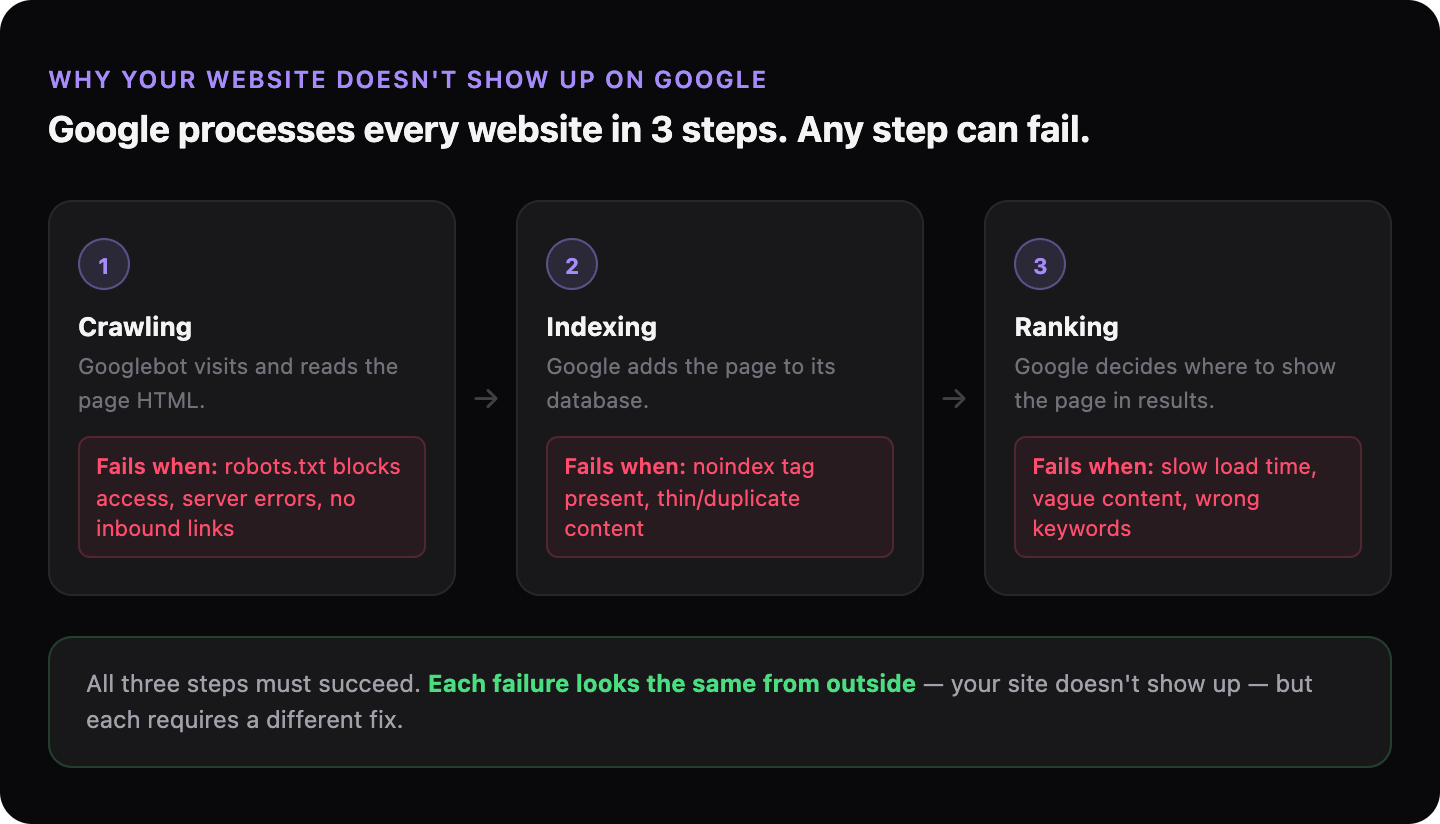
Showing up on Google means two separate things happening in the right order. First, Google has to find and read your website — this is called crawling. Second, Google has to add it to its database — this is called indexing. Only indexed pages can appear in search results. Then, separately, Google has to decide your page is relevant enough to show when someone searches — this is called ranking.
A website can fail at any of these three stages. Each failure looks the same from the outside (you don’t appear) but requires a different fix.
Can Google even reach your website?
Google uses an automated program called Googlebot — a crawler that visits websites and reads their content, following links from page to page. If something blocks Googlebot from entering your site, nothing else matters — Google never gets past the front door.
The most common blocker is a misconfigured robots.txt file — a small text file that tells crawlers which pages they’re allowed to visit. A single wrong line can accidentally ban Google from your entire site. This happens more often than you’d think, especially after a website redesign.
Other blockers: a site that requires a login to view, a server that times out before Googlebot finishes loading the page, or a site that hasn’t been submitted to Google and has no external links pointing to it (so Googlebot has never found it at all).
→ Read more: What is robots.txt and why does it matter for your business?
Is your website indexed?
You can check this yourself in 30 seconds. Open Google and search for site:yourdomain.com — replacing yourdomain.com with your actual domain. If results appear, those pages are indexed. If nothing appears, Google either hasn’t crawled your site yet or something is preventing it from indexing your pages.
A brand new website can take anywhere from a few days to several weeks to appear in Google’s index, depending on how Google discovers it and how active your site is. An established site that suddenly disappears from results is a different problem — usually a technical change that broke something.
→ Read more: How to check if Google can see your website
→ Read more: What does it mean for your website to be “indexed”?
→ Read more: 5 reasons your website disappeared from Google
Is Google indexing your site but not ranking it?
Being indexed and ranking well are different things. Google may have your pages in its database but judge them as not relevant or not authoritative enough to show near the top for the searches you care about.
The most common reason is a mismatch between what your pages say and what people actually search. Your “Services” page might describe what you do in the language you use internally — but your customers search using different words. If your page never mentions the city you work in, Google won’t show it to people searching in that city.
A related problem: multiple pages on your site competing for the same search query. If you have three pages that all vaguely describe the same service, Google doesn’t know which one to rank — so it may rank none of them well. This is called keyword cannibalization.
Is your website too slow to rank?
Page speed — how quickly your site loads — is a direct ranking signal. Google measures it using a set of metrics called Core Web Vitals: how fast the main content appears, how quickly the page responds to interaction, and whether the layout shifts while loading.
A slow site is penalised in two ways: Google ranks it lower, and visitors who do find it often leave before it finishes loading. Both hurt your business.
→ Read more: How page speed is costing you customers
What does Google see when it visits your website?
Google doesn’t see your website the way a human does. It reads the code, not the design. A website can look professional and polished to a visitor but be nearly unreadable to Google — missing page titles, no description of what the business does, or relying entirely on images with no text.
The most important text-based signals Google uses to understand your page: the title tag (the headline that appears in search results), the headings on the page, and the body text. If your homepage title says “Welcome” and your main heading says “Home”, Google has almost nothing to work with.
→ Read more: What Google actually does when it visits your website
How do you find out which problem applies to you?
Each of the problems above requires a different fix, which means the first step is diagnosis — finding out which one is actually affecting your site. Guessing and applying fixes at random wastes time and money.
GhostSite checks all of this in one or two minutes. Paste your URL, and you get a plain-language report showing exactly what’s blocking your visibility — whether it’s a crawling issue, an indexing problem, a speed issue, or something else entirely.