You’ve heard the term “website audit” — maybe a developer mentioned it, maybe you saw it on a marketing agency’s website. But what does an audit actually produce, and is it useful if you’re not technical?
The short answer: a good audit tells you exactly what’s wrong with your website, why it matters, and what to do about it. A bad audit produces a long list of technical items you can’t interpret and don’t know how to prioritise.
What is a website audit?
A website audit is a systematic check of a website’s technical health, visibility, and performance. It looks at the factors that affect whether Google can find and rank the site, whether the site loads fast enough to keep visitors, and whether the site has the basic signals that tell Google (and visitors) that it’s trustworthy and well-maintained.
An audit is a diagnosis, not a fix. It tells you what the problems are. Fixing them is a separate step.
What does a website audit actually check?
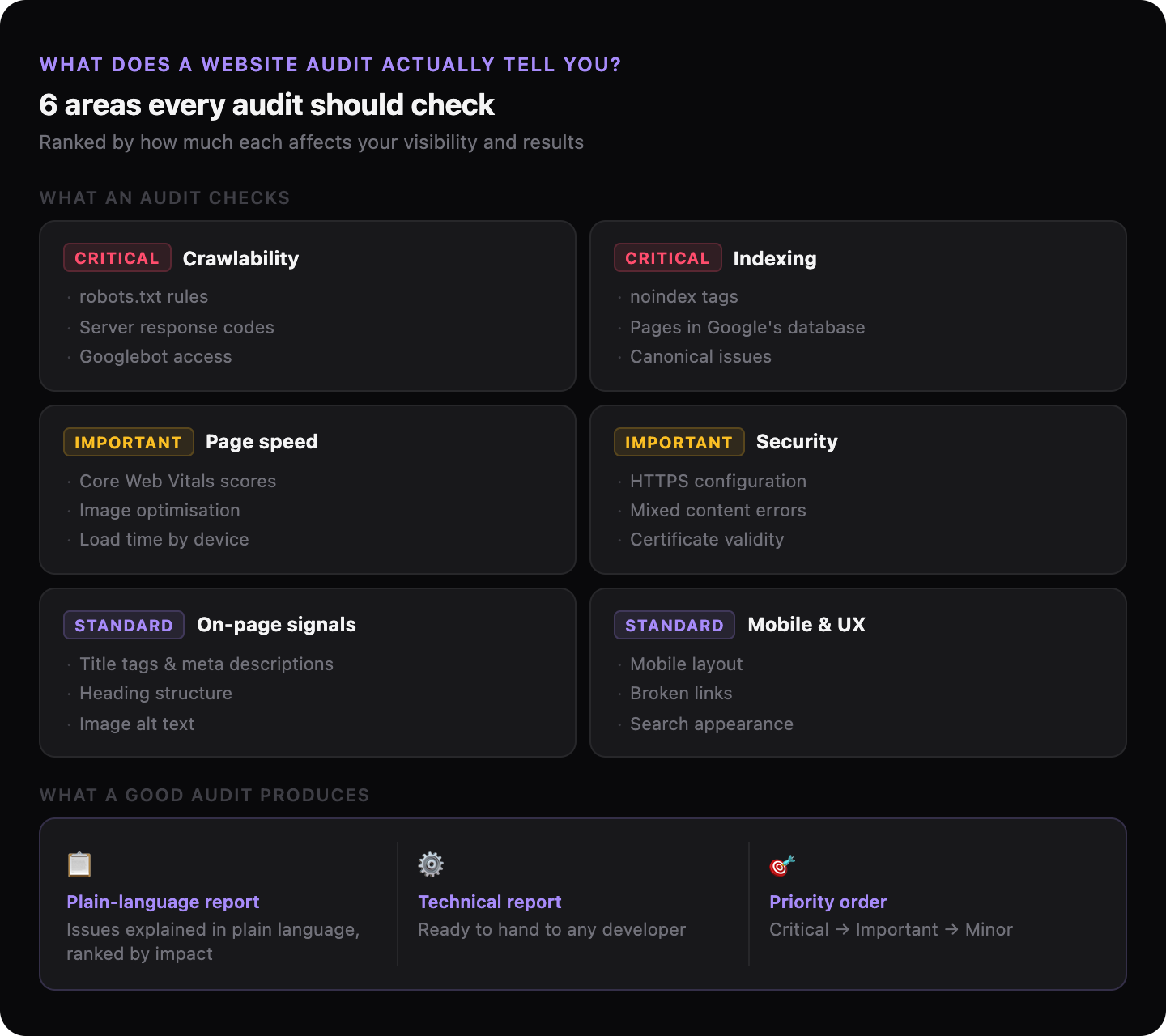
A comprehensive audit checks several distinct areas:
| Area | What it examines |
|---|---|
| Crawlability | Can Google’s crawler access your pages? Is anything blocking it? |
| Indexing | Are your pages in Google’s database? Are any pages accidentally excluded? |
| Page speed | How fast do pages load? What’s slowing them down? |
| On-page signals | Do your pages have titles, headings, and descriptions that tell Google what they’re about? |
| Security | Is HTTPS configured correctly? |
| Mobile usability | Does the site work properly on a phone? |
| Search appearance | How does your site look in Google results? Is the information correct? |
| Broken links | Are there links on your site that lead nowhere? |
Not every audit checks all of these, and not every item is equally important for every site. A good audit tells you which problems are actually hurting your performance — not just which items are technically imperfect.
What does an audit report look like?
A useful audit report does two things: explains what each problem is in plain language, and ranks problems by their impact on your business.
“Missing meta description on 14 pages” is only useful if the report also tells you what a meta description is (the short text that appears under your page title in Google results), why it matters, and whether it’s something you should fix this week or something you can leave for later.
A report that just lists technical items without explaining them or prioritising them is not useful to a business owner. It’s only useful if you hand it to a developer who already knows what everything means — which defeats the purpose of getting an audit in the first place.
→ Read more: How to hand a report to your developer without explaining everything yourself
Do I need a developer to understand an audit?
It depends on the audit. Most traditional SEO audit tools produce technical reports written for specialists. GhostSite produces two versions of the same report: one in plain language for the business owner, one in technical language for the developer. You don’t need to understand the technical version — you need to understand what’s wrong and what to do about it, and that’s what the plain-language version provides.
→ Read more: How to talk to a web developer when you’re not technical
What’s the difference between a free and a paid audit?
Free website audit tools — there are many — typically run a quick automated check and produce a score or a list of basic issues. They’re useful for getting a broad picture but often miss context-specific problems and don’t prioritise findings in a way that helps a non-technical owner decide what to do.
A paid audit (whether from a tool like GhostSite or from a specialist) should tell you something the free tools don’t: specifically what’s hurting your performance, ranked by impact, with enough explanation that you know whether to fix it yourself or hand it to a developer.
The value isn’t in the number of items checked. It’s in whether you understand the findings well enough to act on them.
What should I do with audit results?
An audit result is only useful if it leads to action. The general approach:
- Fix critical issues first — anything blocking Google from accessing or indexing your site, and anything that’s actively warning visitors away (like a missing HTTPS certificate).
- Address performance issues second — slow loading times affect both ranking and conversion.
- Work through on-page issues — missing titles, poor descriptions, thin content.
- If you’re not fixing things yourself, send the technical report to a developer. A good audit report includes enough detail that a developer can act on it without you having to explain anything.
→ Read more: What to ask before hiring someone to fix your website
→ Read more: When to fix your website yourself and when to hire someone
How do I get an audit for my website?
GhostSite runs a full audit in one to two minutes. Paste your URL, and you get a plain-language report showing what’s wrong and what to fix — ranked by impact. No sign-up required.